
How to Use SSML in TTSForge: Complete Guide
TTSForge is a powerful text-to-speech platform that allows you to generate natural-sounding audio from text in over 40 languages. One of its most powerful features is SSML (Speech Synthesis Markup Language), which gives you control over how text is spoken — adding pauses, emphasis, pitch, speed, and more.
1. Why SSML Matters
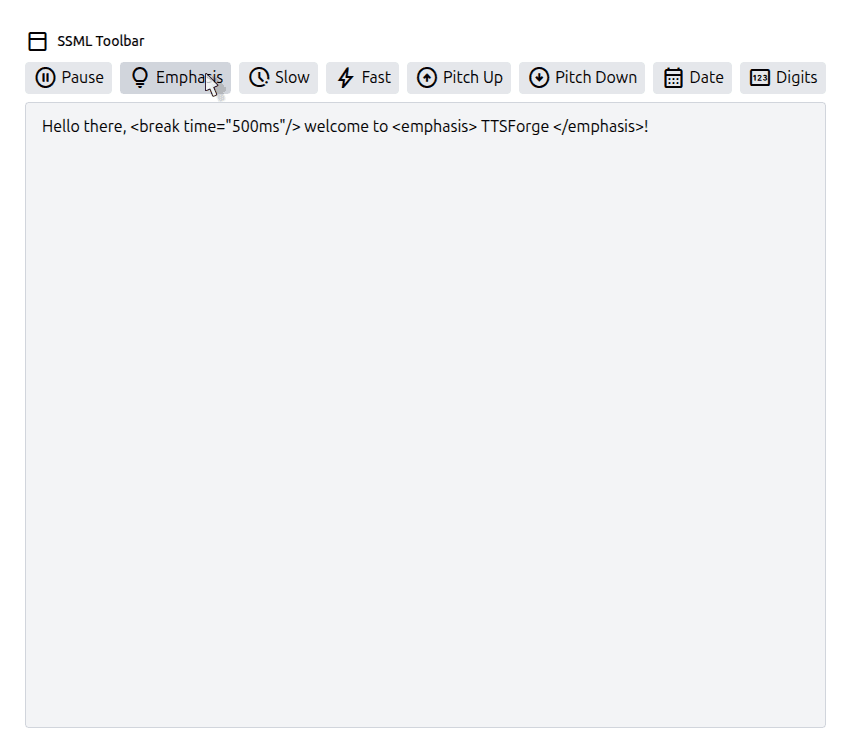
Normal text-to-speech works fine, but it often sounds robotic. With SSML, you can make voices sound more natural and engaging. In TTSForge, SSML tags are supported directly in the editor — just type them into the textarea or use the toolbar icons.
2. Getting Started with TTSForge
- Go to ttsforge.com.
- Select your preferred language and voice.
- Type or paste your text in the editor.
- Insert SSML tags manually or via the toolbar.
- Click Convert to Speech to preview the audio.
- Download the result as MP3, WAV, or OGG.
3. Common SSML Tags in TTSForge
TTSForge supports several SSML tags for fine-grained voice control. Note: You don't need to wrap your text with <speak> in TTSForge — just insert tags directly.
3.1 <break> — Insert Pauses
The <break> tag adds a pause in speech. Useful for separating ideas or creating dramatic effect.
time="500ms"→ pause for 0.5 secondsstrength="strong"→ natural pause (weak, medium, strong, etc.)
3.2 <emphasis> — Stress Words
Highlight words or phrases by making them sound stronger or more important.
level="strong"→ stronger emphasis- Other options:
moderate,reduced
3.3 <prosody> — Control Speed, Pitch, Volume
Adjust how the text is spoken: slower or faster, higher or lower pitch, louder or softer.
rate="slow"orfast→ adjust speedpitch="+5%"or-5%→ adjust pitchvolume="loud",x-soft, etc. → adjust loudness
3.4 <say-as> — Read Numbers & Dates
Control how numbers, dates, or symbols are spoken.
interpret-as="telephone"→ reads digits as phone numberinterpret-as="date"+format="dm"→ reads as day-month- Other options:
digits,ordinal,cardinal
3.5 <sub> — Pronunciation Substitution
Replace how text is spoken without changing the text itself. Great for acronyms or mispronounced words.
alias→ the spoken replacement- Here, "AI" is read as "Artificial Intelligence"
4. Practical Steps for Using SSML
- Type your normal text in the editor.
- Add SSML tags (Pause, Emphasis, Prosody, etc.).
- Preview the audio output.
- Tweak tags until it sounds natural.
- Download the final audio file.
5. Full Example
6. Pro Tips
- Use short pauses (
<break time="200ms"/>) for natural rhythm. - Mix
<prosody>and<emphasis>for storytelling. - Use
<say-as interpret-as="digits">to read numbers digit by digit. - Always preview before downloading.
- Some voices may interpret SSML differently — test across voices.
7. Conclusion
SSML is the secret to making text-to-speech sound natural and expressive. With TTSForge, you can add pauses, adjust pitch, change speed, and control pronunciation for professional results. Perfect for narration, e-learning, podcasts, or videos.
Try it now at TTSForge.com and take your voice projects to the next level!